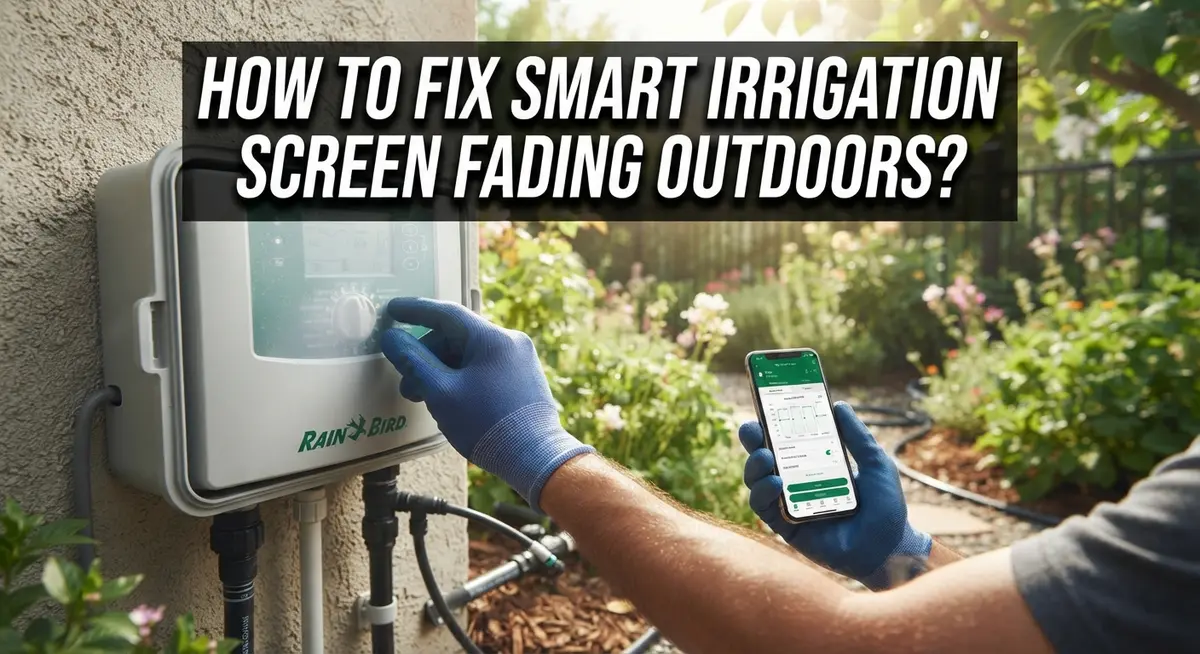
How To Fix Smart Irrigation Controller Screen Fading Outdoors?
Does your smart irrigation controller screen look faded or blank? You are not alone.
Many homeowners face this problem after months of outdoor use. The sun, rain, and cold weather can take a toll on your device.
Screen fading often happens because of power loss or weather exposure. Cold temperatures can freeze the LCD display. Sun and rain can wear down the screen over time.
This issue can leave you confused about your watering schedule. You might miss important settings or alerts.
The good news? You can often fix this problem yourself. Sometimes a simple power check solves everything.
In a Nutshell
- Check the power supply first. Most screen fading issues start with a loss of power to your controller. Test your outlet with a lamp or radio to confirm it works.
- Cold weather can freeze the display. When your controller loses power in cold temperatures, the LCD screen may freeze and fail permanently. This is a common cause of green or blank screens.
- Weather exposure damages screens over time. UV rays and outdoor elements slowly wear down LCD displays. Proper shelter can extend your controller’s life.
- Know the typical lifespan. Many controllers last around three years before screen problems appear. This helps you plan for replacement.
- Replacement may be necessary. If your LCD screen shows permanent damage, fixing it yourself usually is not possible. A new controller becomes your best option.
- Prevention matters most. Keep steady power flowing and add weather protection to avoid future screen issues. Small steps now save you bigger headaches later.
Why Smart Irrigation Controller Screens Fade Outdoors
Smart irrigation controller screens fade outdoors for several specific reasons. Understanding these causes helps you prevent the problem before it starts.
Power loss is the primary culprit. Your controller’s LCD display requires consistent electrical power to function properly. When power drops or cuts off completely, the screen stops refreshing. This is especially damaging during cold months when your system sits idle without power protection.
Cold temperatures freeze LCD displays. Winter weather creates a dangerous combination. When your controller loses power during freezing conditions, the liquid crystals inside the screen become immobilized. Once frozen, these crystals rarely return to normal operation. The display turns green, blank, or completely unresponsive.
UV rays and moisture break down screens. Direct sunlight damages LCD panels over extended periods. Rain, humidity, and temperature swings accelerate this deterioration. Even weatherproof controllers experience gradual fading because the display itself remains exposed to outdoor elements.
Typical lifespan limitations matter. Most smart irrigation controllers show screen problems after approximately three years of outdoor use. This is normal wear and tear, not a defect. The LCD technology simply degrades faster in outdoor conditions than indoor environments.
Power surge damage is real. Lightning strikes and electrical fluctuations can instantly damage your screen. A single power surge may cause permanent LCD failure without warning.
Inadequate shelter worsens problems. Controllers mounted in direct sun or without any protective covering experience faster screen fade. Exposure to rain, dust, and extreme temperatures accelerates failure.
These environmental factors work together to damage your screen. Most homeowners experience fading after their controller endures multiple seasons of outdoor weather exposure. Recognizing these causes helps you take preventive action now.
Diagnosing the Problem: Power Loss vs. Environmental Damage
You need to figure out whether your screen faded because of power problems or environmental damage. This distinction matters because each issue requires a different solution.
Start by checking your power supply. Plug a lamp or radio into the same outlet where your controller connects. If the lamp works, your outlet has power. If it does not work, your outlet is dead. This tells you immediately whether power loss caused your screen problem.
Next, inspect your controller’s power cable and connection points. Look for loose wires, corrosion, or damage to the plug. A loose connection can cut power without you knowing it. Wiggle the cable gently while watching the screen to see if it flickers. Flickering indicates an unstable power connection.
Now examine the controller housing itself. Check for water inside the unit, cracks in the casing, or visible moisture around the screen. These signs point to environmental damage rather than power loss. Water exposure and UV rays damage LCD panels permanently.
Consider the weather patterns in your area. If you live somewhere with harsh winters, cold temperatures combined with power loss can freeze your display. If you experience intense summer sun, UV exposure alone may have degraded your screen over time.
Pay attention to when the fading started. Did it happen suddenly after a storm or power outage? That suggests power loss. Did it happen gradually over months? That indicates environmental wear.
Once you identify the cause, you can decide your next step. Power issues sometimes have simple fixes. Environmental damage usually requires controller replacement. Understanding your specific problem saves time and money.
Step-by-Step: Checking Your Power Source and Connections
A power source problem is the most common reason your irrigation controller screen fades. Start by checking if power reaches your controller at all.
Find the outlet where your controller plugs in. Plug a lamp or radio into that same outlet. If the lamp turns on, your outlet works fine. If nothing happens, you found your first problem.
Next, inspect the power cable itself. Look for visible damage like cuts, cracks, or exposed wires. Check where the cable enters your controller box. Make sure the connection is tight and secure.
Gently wiggle the power plug while watching the controller screen. Does the display flicker or change? This means your connection is loose. Tighten it firmly.
Look at the controller’s power indicator light. Most models have a small LED that glows when power flows correctly. If this light is off or dim, power is not reaching your device.
Check your home’s circuit breaker panel. Find the breaker that controls your irrigation system. Flip it off, then back on. Wait thirty seconds and see if your screen brightens.
If you have an outdoor power outlet, verify it has a working ground fault circuit interrupter. Press the test button. Press the reset button. This protects your controller from electrical problems.
Take photos of your connections before making changes. This helps you remember how everything was arranged.
Once you confirm power reaches your controller, you can move forward with other solutions. If power is present but your screen still fades, the problem likely involves environmental damage or LCD failure instead.
Step-by-Step: Weatherproofing and Shelter Solutions
Your smart irrigation controller needs protection from the outdoor environment. This section explains how to weatherproof your controller and create proper shelter solutions.
Start by assessing your current setup. Look at where your controller sits right now. Is it in direct sunlight all day? Does rain splash against it? Is it exposed to extreme temperature swings? These conditions accelerate screen fading and damage.
Install a protective enclosure around your controller. A simple weatherproof box or cabinet works well. Make sure the enclosure allows air circulation so heat doesn’t build up inside. Ventilation prevents moisture from trapping around your controller’s electronics.
Position your controller in a shaded location whenever possible. Place it under an eave, against a north-facing wall, or beneath a tree canopy. Direct sunlight is one of the biggest enemies of LCD screens. Even partial shade makes a significant difference in screen longevity.
Consider adding a rain shield or awning above your controller. This protects it from water spray and reduces UV exposure. Leave gaps on the sides so air can flow freely. Proper drainage prevents water from pooling near your controller.
Keep your controller away from extreme heat sources. Don’t mount it near air conditioning units or heat pumps. These create temperature fluctuations that stress LCD displays. Consistent temperatures help your screen last longer.
Check mounting hardware regularly. Ensure your controller stays secure and level. Vibration from wind or equipment can damage internal components over time. Tighten any loose bolts or brackets you find.
Combine these weatherproofing steps with consistent power supply to maximize your controller’s lifespan. A protected, powered controller resists screen fading far better than an exposed, unpowered unit. Your outdoor irrigation system will perform reliably for years with proper shelter and maintenance.
When Screen Fading Signals a Deeper Hardware Failure
Screen fading often signals that your controller has suffered damage beyond simple display issues. Understanding when replacement becomes necessary helps you avoid wasting time on repairs that won’t work.
Power failure combined with cold temperatures creates a dangerous situation for LCD screens. When your controller loses power during winter months, the liquid crystal material inside the display can freeze. This freezing causes permanent damage to the screen’s ability to display information. Once this happens, no amount of power restoration will fix the display.
Environmental exposure over time degrades internal components. Moisture seeps into circuit boards through tiny cracks in the housing. UV rays penetrate protective coatings and weaken the LCD panel itself. After three to five years of outdoor exposure, most controllers show signs of permanent screen degradation.
You can identify deeper hardware failure by looking for these warning signs. If your screen stays completely green or black even after power restoration, the LCD panel has likely failed. If the display shows no response to button presses, the controller’s internal circuitry may be damaged. If you notice corrosion around the power connections or water inside the housing, hardware failure has progressed significantly.
Testing the display helps confirm whether replacement is necessary. Press the controller buttons and observe any screen response. Check if the display changes when you adjust settings. If nothing happens, hardware failure is likely present.
At this stage, repair attempts usually fail. Replacing the entire controller becomes your best option. A new unit ensures reliable operation for years ahead. Investing in proper weatherproofing and consistent power supply prevents this situation from happening again with your next controller.
Preventing Future Screen Fading and Extending Controller Lifespan
Your smart irrigation controller’s lifespan depends on how well you protect it from outdoor conditions. Consistent power supply is your first defense against screen fading and component failure. Make sure your controller stays plugged into a reliable outlet year round, even during winter months when you’re not actively watering.
Temperature fluctuations cause significant damage to LCD screens. When power cuts off during cold weather, the display freezes and may never recover. Keep your controller powered continuously to prevent this problem. If you live in a cold climate, this step becomes even more critical for device longevity.
UV rays and moisture are constant enemies of outdoor electronics. Position your controller where it receives shade for most of the day. Direct sunlight accelerates screen degradation and internal component wear. Install a protective cover or enclosure that shields the device from rain, snow, and dust without blocking ventilation.
Check your controller’s mounting hardware every few months. Loose connections allow water to seep into electrical components. Tighten any bolts or brackets that have shifted over time. Inspect the power cable for cracks or damage regularly.
Replace your controller proactively if you notice early warning signs like dimming displays or flickering screens. Most controllers last three to five years with proper care. Waiting until complete failure occurs may leave you without irrigation during critical growing seasons.
Document your controller’s installation date and maintenance activities. This record helps you anticipate replacement needs before problems develop. Plan your budget accordingly so you can upgrade when necessary without emergency pressure.
Common Mistakes That Accelerate Screen Damage
Many people make simple mistakes that destroy their smart irrigation controller screens long before they should fail. Understanding these errors helps you avoid expensive replacements and keep your system running smoothly.
Leaving your controller unpowered during cold months is one of the biggest mistakes. LCD screens rely on consistent electrical power to maintain their liquid crystal structure. When power cuts off and temperatures drop, the screen freezes and fails permanently. This combination creates irreversible damage that no troubleshooting can fix.
Inadequate outdoor protection ranks as the second major error. Owners often mount controllers in direct sunlight or exposed locations without any shelter. Rain, UV rays, and extreme heat work together to degrade the display and internal circuits. Your controller needs shade and weather protection to survive outdoor conditions.
Ignoring early warning signs accelerates damage significantly. Dimming displays, flickering screens, and color changes are red flags. Many people ignore these signals and continue using the controller until it fails completely. Catching problems early gives you time to weatherproof better or plan for replacement.
Improper mounting also contributes to screen failure. Controllers installed too close to heat sources, direct water spray, or areas with poor air circulation experience faster degradation. Hardware that loosens over time allows moisture and debris to enter the unit.
Failing to check power connections regularly creates hidden problems. A loose wire or corroded terminal cuts power intermittently, especially during cold snaps. Your controller needs stable, consistent power year round.
The key to avoiding these mistakes is simple: maintain steady power supply, provide adequate shelter from weather, monitor your display condition, and check connections regularly. These preventive actions cost far less than replacing your entire controller system.
Troubleshooting Checklist for Persistent Display Issues
Start your troubleshooting by checking the most obvious culprit: power supply. Use a lamp or radio to test the outlet where your controller connects. If the outlet works fine, move to the controller itself. Look at the power cable for visible damage, cuts, or exposed wires.
Next, inspect the connection points where the power cable meets your controller. Loose connections happen frequently and cause display problems. Push the connector firmly into place. Sometimes debris blocks the connection, so wipe both surfaces clean with a dry cloth.
Check your controller’s location and shelter. Controllers exposed directly to sun, rain, or extreme temperature swings suffer faster screen degradation. Move the unit to a shaded spot if possible. A simple cover or shelter box provides significant protection without blocking sensor signals.
Test the display itself by powering off the controller completely. Wait 30 seconds, then power it back on. This resets the system and sometimes fixes temporary glitches. If the screen remains faded or green after restart, note whether it responds to button presses or touch input.
Examine the screen for physical cracks or moisture inside the display area. Condensation trapped behind the glass indicates water damage. This usually means replacement is necessary since internal moisture causes permanent failure.
Document what you observe: Does the screen flicker? Does it fade gradually or suddenly? Does it respond to input despite poor visibility? These details help determine if your issue is power related, environmentally caused, or indicates hardware failure.
Record the date your controller was installed. Most controllers last about three years outdoors. If yours approaches this age and shows multiple problems, replacement becomes more practical than continued troubleshooting.
Final Thoughts
Screen fading happens for clear reasons. Power loss, cold exposure, and weather damage all play a role. Understanding these causes helps you take the right action.
Quick fixes work sometimes. Checking power connections and testing outlets solves many problems. But a permanently faded LCD screen usually needs replacement.
Your controller faces tough conditions every day. Sun, rain, and temperature swings wear down the screen over time. This is normal for outdoor electronics.
Prevention beats repair in almost every case. Keeping steady power flowing to your controller matters most. Cold weather without power causes serious LCD damage.
Weather protection extends your controller’s life significantly. A simple shelter or cover blocks harmful UV rays and moisture. This small step prevents big problems later.
Watch for early warning signs like dimming or flickering. These signals tell you trouble is coming. Acting early saves you from complete screen failure.
Most controllers last around three years with proper care. This lifespan can shrink fast without protection. Good maintenance habits make a real difference.
Regular checks catch issues early. Look at your power connections and mounting hardware often. This simple habit prevents costly surprises down the road.
When your screen does fail completely, don’t panic. Replacement is often the practical solution at that point. A new controller gets your system running smoothly again.
Smart irrigation controllers work hard in tough outdoor spots. Treating them well pays off through reliable performance. Your lawn and garden depend on this consistency.
Take these steps seriously from day one. Protect your power supply. Shield your controller from weather. Watch for warning signs. These simple actions keep your system working well for years to come.
Frequently Asked Questions
Why does my smart irrigation controller screen turn green?
A green screen typically means your controller lost power or experienced a power surge. LCD displays fail when they don’t receive steady electricity. Cold temperatures make this worse because the screen freezes without power flowing through it. Environmental exposure to rain, sun, and temperature swings also damages the display over time. Check your power outlet first by plugging in a lamp or radio to confirm it works.
Can I fix a faded or blank screen myself?
Sometimes yes, sometimes no. If your screen faded gradually, the issue might be simple power loss. Restart your controller by turning it off for 30 seconds, then back on. Check that all cable connections are tight and secure at both ends. If the screen remains blank after a restart and your power source works, the LCD panel itself may be permanently damaged. Replacement becomes your only option at that point.
How do I prevent screen fading in the future?
Maintain a steady power supply at all times, even during winter months. Install your controller in a sheltered location away from direct rain and intense sun exposure. Use a weatherproof cabinet or enclosure designed for outdoor electronics. Keep the controller away from sprinkler spray zones. Check your power connections every few months to catch loose wires early. These simple steps add years to your controller’s life.
What’s the typical lifespan of a smart irrigation controller?
Most controllers last about three years with proper care and maintenance. Some fail sooner if exposed to harsh conditions without protection. Others last longer when kept powered and sheltered from extreme weather. Regular inspection helps you spot problems before they become serious.

Hi, I’m Pearl Standen, the voice behind The Web Utility. I’m a passionate tech enthusiast who loves exploring the latest gadgets, smart devices, and electronics that make everyday life easier. Through my website, I share honest, well-researched reviews of trending Amazon products to help you make smarter buying decisions.